A short definition
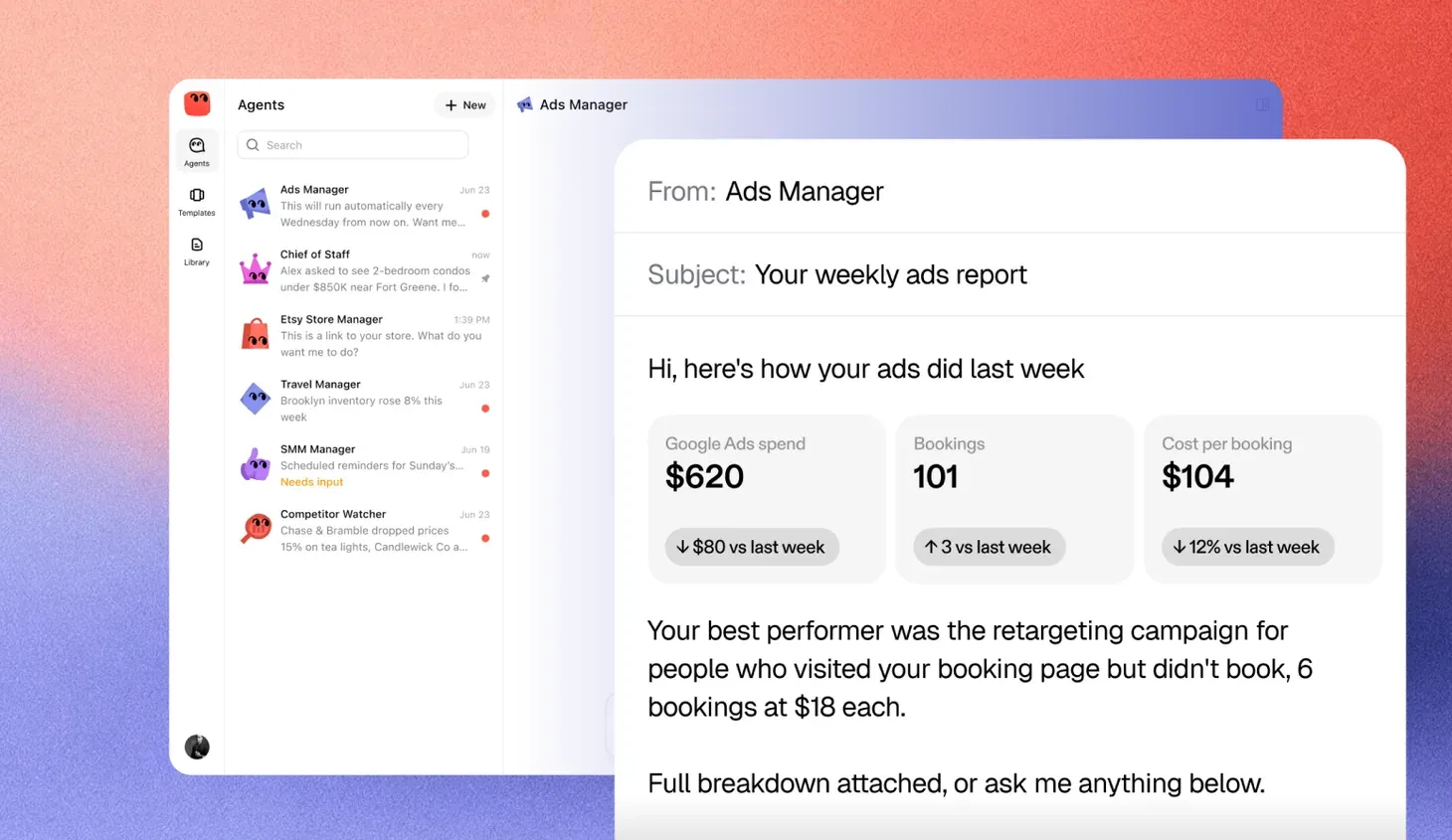
An ads manager agent is an AI agent whose job is your paid advertising. It connects to ad accounts like Google Ads or Meta, reads how each campaign is doing and makes changes inside the budget and rules you set. It reports back in plain words, and it asks before it does anything you have marked as yours to decide.
Think of the work a freelance media buyer does in the first hour of each day. Check yesterday’s spend. Spot the ad that stopped working. Move money toward what is bringing in customers. An ads manager agent does that every day, without the hour.
Why enterprise marketing teams look at one
At enterprise scale the problem is not one campaign drifting. It is hundreds of campaigns across brands, regions and platforms, each spending every hour. A performance team can review the biggest accounts daily. The long tail gets looked at weekly, and an agency usually reports monthly. The money in between goes out on autopilot.
Budgets also have more owners. A regional team owns its campaigns, finance owns the quarterly number, and the brand team owns what an ad may say. Keeping spend paced against each of those, every day, is the work that falls between the people who own it.
An ads manager agent fills that gap. It does not replace good creative, media planning or an agency’s strategy. What it replaces is the daily checking across every account, the small fixes and the pacing that slip when the team is stretched across too many of them.
What it does in a normal week
- Watches spend. Checks spend against budget every day, so a campaign never quietly overspends.
- Pauses what is not working. Turns off ads whose cost per result has drifted past the limit you set.
- Moves budget. Shifts money between campaigns, toward the ones that bring in customers.
- Tests copy. Writes new versions of ad text to try, and flags the winners.
- Spots problems early. Notices a broken landing page, a rejected ad or a sudden jump in cost, and tells you.
- Reports. Sends a short weekly summary of what changed, what it cost and what came back.
Maui’s Ads Manager does this work. It pauses the ads wasting money, tests fresh creative every week and shifts budget toward what converts, within your ceiling.
A day in practice
Picture a retailer running campaigns in twelve countries on Google and Meta. On Tuesday morning the agent sees that the German shopping campaigns spent their usual amount overnight but brought in a third of the usual orders. It checks the product pages and finds the checkout failing on phones in the German store. It pauses those campaigns so the money stops going out, tells the e-commerce team and the DACH marketing lead what it found, and keeps every other country running. When the checkout is fixed, it turns the German campaigns back on and watches the first day closely.
No single step there is hard. The value is that it happened on Tuesday morning, across every country, not on Friday when the weekly report surfaced it.
What it needs from you
An agent is only as good as its brief. Before it starts, it needs four things.
A goal you can measure
More sales is a wish. New customers at under $40 each in the UK, inside a monthly budget for that brand, is a goal. The agent can work toward it, and you can check whether it got there. Pick the number you would judge a person by.
A budget and its limits
Set the monthly cap for each brand or region, the most it can move in a day and which campaigns it may touch. Those limits are what make it safe to leave running. They also make the conversation simple when you review its work, because you know the worst case before it starts.
Access to the accounts
It needs to read and change your ad accounts. Ideally it also sees sales in your commerce platform, CRM or data warehouse, so it can tell a click from a customer. An agent that only sees clicks will chase clicks. An agent that sees orders can chase orders.
Your approval rules
Decide what always comes to you. Launching a new campaign, raising the budget and anything that talks about prices or offers are the usual ones. Add your brand and legal review where a regulated claim is involved. Write them down, the same way you would brief a new hire.
Ads manager agent vs. platform automation vs. an agency
Google and Meta already automate a lot, with automated bidding and automatic placements. That automation works inside one platform, and it optimizes toward that platform’s own signal. An agency brings media planning, creative and a team that has seen many accounts, at the pace of its contract and its account team’s week.
| Platform automation | Ads manager agent | Agency | |
|---|---|---|---|
| Where it works | Inside one ad platform | Across your ad accounts and your sales data | Wherever you give them access |
| What it aims for | The platform’s conversion signal | The goal and limits you set per brand or region | The targets in the contract |
| How often it checks | Constantly, inside its own platform | Every day, or when something changes | Daily on the biggest accounts, weekly or less on the rest |
| Who sets the rules | The platform | You | You and them, through a scope of work |
| How you see what changed | The platform’s change history | A record of every change and a weekly summary | Monthly reports and review calls |
| How it is paid | Included in your media spend | Varies by product, so ask whether it is per agent, per account or tied to spend | A share of spend, a retainer or both |
| Where it is strongest | Bids and placements | Daily checks, pacing and early warnings | Strategy, creative, planning and new channels |
What an agency costs
Most paid media agencies charge a share of what you spend. Published guides put the usual range at 10% to 20% of monthly ad spend, with the percentage falling as budgets grow. Above about $100,000 a month it often lands between 8% and 12%, and some agencies charge a base retainer plus a smaller share above a threshold. OuterBox puts the fee for accounts spending over $100,000 a month at $10,000 to $25,000 or more. At the largest media buys, retainers can come to around 4% of spend.
Two things to watch in an agency contract. A share-of-spend fee rises with your budget whether or not the work does, so a brand that triples its spend triples its fee. And creative, landing pages and reporting are often billed outside the base fee, which raises the real rate. These figures come from agency and pricing guides rather than independent surveys, and enterprise rates are negotiated case by case.
How they work together
The three are not either-or. The agent decides where the money goes each day and when to stop, the platform’s bidding does the moment-to-moment work inside those choices, and the agency sets direction, plans media and makes creative. Many teams use the agent to take the daily checking off the agency’s scope, which is where its fee is easiest to narrow.
Where it stops
A good ads manager agent knows what is not its call. It should never do these on its own.
- Raise your budget. Spending more is always your decision.
- Make claims you have not approved. New offers, prices, guarantees or health claims go to you first.
- Keep spending when results fall away. If costs climb past your limit, it pauses and tells you rather than hoping things recover.
- Launch to a new audience or region. New markets are a business choice, not a daily tweak.
In each case it pauses, shows you what it found and waits for you. Then it carries on from where it stopped.
How to judge an ads manager agent
When you look at any product in this space, the questions below matter more than the feature list.
| What to check | Question to ask |
|---|---|
| Accounts | Which ad platforms can it change, not only read? |
| Sales data | Can it see orders or leads, or only clicks? |
| Limits | Can I set a daily cap, a monthly cap and campaigns it may not touch? |
| Approvals | Can I choose which changes always come to me first? |
| Record | Can I see every change it made, when and why? |
| Undo | Can I reverse a change, or pause the agent, in one step? |
| Reporting | Will I get a plain summary without logging in to every platform? |
| Brand safety | How does it make sure new ad copy matches what I am allowed to say? |
Signs it is not ready for your budget
- It cannot explain why it made a change.
- It has no hard spending limits, only targets.
- It reports on clicks and impressions but never on customers.
- It needs you to approve every small change, which leaves the daily work with you.
Getting started
Start small. Connect one brand’s or one region’s ad accounts and one source of sales data. Set a tight budget and strict approval rules for the first few weeks, and read every summary. Once the agent’s calls match the ones you would have made, loosen the rules a little at a time. That is how you would bring on a new media buyer, and it works the same way here.
What to look at in the first month
- Spend against plan. Did it stay inside the caps every day, not just across the month?
- Cost per customer. Is the number you set as the goal moving the right way?
- The changes it made. Read the record and ask whether you would have made the same calls.
- The questions it asked. Too many means the rules are too tight. None at all may mean they are too loose.
- What it caught. Note the broken pages, rejected ads and cost jumps it flagged before you saw them.
If those answers look like the work of a careful media buyer, give it more room. If they do not, tighten the rules, fix the brief and run another month before you widen its budget.